


Establishing a charity website in the UK is a noble endeavour that can significantly impact communities. Whether you’re passionate about alleviating poverty, advancing education, or protecting the environment, creating a WordPress charity site allows you to dedicate resources to causes you care about.
However, starting a charity involves several steps and legal requirements that must be carefully navigated. This guide provides a clear and concise path for setting up a charity website in the UK, incorporating legal, operational, and promotional aspects to ensure your charity succeeds and thrives.
Steps to Build a WordPress Charity Website
Creating a charity website in the UK is essential for amplifying your mission, engaging supporters, and securing online donations. A well-designed site enhances visibility, connects with donors, and promotes your cause effectively. Follow these steps to establish an impactful website for your charity.

Step 1: Planning and Preparation for a UK Charity Website
Effective planning lays the foundation for a successful charity website. By clearly defining your goals, you ensure your website meets its purpose and engages your audience.
- Determine the Purpose: Decide whether the website will focus on accepting donations, promoting events, or sharing success stories.
- Identify Your Target Audience: Understand the needs of website visitors, donors, and volunteers to tailor the site accordingly.
- Set Clear Objectives: Establish specific goals, such as increasing online donations or enhancing user engagement.
Step 2: Choose a Domain Name, Hosting, and Website Builder
Selecting the right domain name, hosting provider, and content management system (CMS) is crucial for building a charity website. These elements work together to ensure your website is accessible, reliable, and easy to manage.

- Select a Domain Name: Choose a domain name that is easy to remember and directly relates to your charity’s name and mission. This will help visitors easily find your site and reinforce your brand identity.
- Hosting: Select a reputable UK web hosting provider to ensure your website is fast and secure. Options like WPEngine, HostArmada, InMotion Hosting, and Hostinger offer reliable performance and good customer support. Make sure your chosen website hosting service can scale with your charity’s growth and provides excellent support, ensuring your website remains accessible and functional as traffic increases.
- Choose a CMS/Website Builder: Consider using WordPress as your website builder due to its cost-effectiveness and flexibility. The WordPress CMS offers a wide range of themes and plugins, making it suitable for charities with varying needs and budgets.
Learn: Reasons Why NASA Used WordPress CMS
Step 3: Installing WordPress
Installing WordPress is a straightforward process that sets the stage for building your charity website. Here’s a concise guide to get started on your new website:
- Choose a Hosting Provider: Select a reliable hosting service that offers one-click WordPress installation, such as Pressable or Kinsta.
- Access Hosting Control Panel: Log in to your hosting account and navigate to the control panel (often cPanel).
- Locate WordPress Installer: Find the WordPress installer, usually under the ‘Software’ or ‘Website’ section. Look for options like Softaculous or an auto-installer tool.
- Initiate Installation: Click on the WordPress installer and follow the prompts. Enter details such as site name, admin username, password, and email.
- Configure Site URL: Choose your preferred domain and ensure the installation path is correct (typically the root directory).
- Complete Setup: Click ‘Install,’ and once the process is complete, you’ll receive a confirmation email. You can now access your site through the WordPress admin dashboard.
This simple installation lays the groundwork for customising your site with its user-friendly interface and adding content to support your charity’s work and mission.
Related: Essential Settings After Installing WordPress
Discover the Power of Tailored Web Design for Your Charity
Enhance your charity’s online impact with bespoke web design solutions. Connect with us to discuss your specific requirements.
Step 4: Designing Your Charity Website
Designing your charity website or non profit organisation site involves selecting templates that appeal to visitors. So, begin with selecting a suitable WordPress charity template that aligns with your charity’s mission.
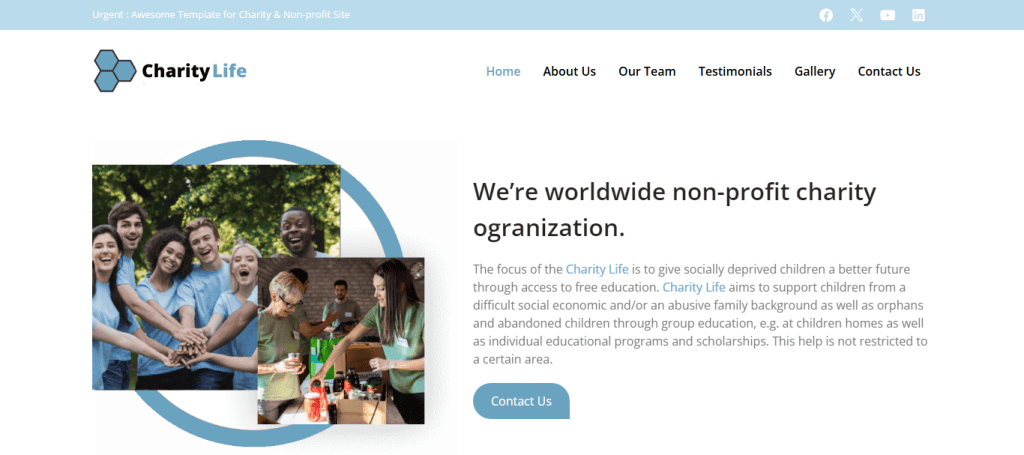
- Choose a Template: Look for a design that suits charity websites, focusing on empathy and clarity. For example, WordPress templates with clean layouts and sections for storytelling can effectively communicate your mission.
- Customise to Reflect Brand: Adapt colours, fonts, and images to match your charity’s branding. For instance, if your logo is predominantly blue, incorporate this colour throughout the site for consistency.
- Structure and Navigation: Ensure the website layout is intuitive with clear paths to key areas like the donation page. A prominently placed ‘Donate Now’ button on the header is a good practice.
- Mobile-Friendly Design: Ensure your website is responsive, automatically adjusting to fit any device, whether it’s a smartphone, tablet, or desktop. This is critical as more users access websites through mobile devices.
Find out: Essential Elements of Modern Website Design for UK Businesses
Step 5: Create Engaging Content and Visuals
Crafting compelling content and utilising high-quality visuals are essential for capturing your audience’s interest and conveying your charity’s impact.
- Develop a Content Strategy: Plan regular updates such as news articles, event announcements, and success stories. This keeps your website dynamic and encourages repeat visits. For example, a monthly blog series on beneficiary stories can showcase the impact of donations.
- Use High-Quality Visuals: Include images and videos highlighting your charity’s activities and achievements. Pictures of beneficiaries, event highlights, and volunteer sign ups & efforts can be powerful.
- Ensure Accessibility and Engagement: Make content accessible by using clear language and ensuring compatibility with assistive technologies. For example, add alt text to images for visually impaired users and ensure videos are captioned.
Check out: WordPress Website Accessibility Features
Step 6: Add Essential Pages and Features
To ensure your charity website effectively informs visitors and facilitates donations, incorporating essential pages and features is crucial. These elements provide the foundation for clear communication and seamless user interaction.
- Home Page: Design an inviting home page that offers an overview of your charity’s mission, goals, and key activities. It should engage visitors immediately, with easy access to further information and donation options.
- About Us Page: Provide comprehensive background information about your charity, including its history, mission, and team members. This builds trust and transparency, helping potential donors understand your impact.
- Donation Page: Establish a clear and persuasive dedicated donation page. Include compelling reasons to donate, options for different donation amounts, and details on how contributions will be used.
Incorporate features that facilitate easy and secure donations to enhance the funding aspect of your website.
- Secure Payment Gateway: Implement a payment gateway that ensures secure transactions, instilling confidence in donors that their information is protected. Services like PayPal or Stripe are commonly used for their reliability.
- Donation Form: Use plugins such as WP Charitable, an all-in-one WordPress donation plugin, to create intuitive and customisable donation forms. These forms should be user-friendly and offer various options, such as one-time or recurring donations.
Step 7: Launch and Test Your Website
Launching your charity website is an exciting milestone, but thorough testing is essential to ensure optimal performance and user satisfaction.
Test for Usability, Accessibility, and Functionality
Before going live, conduct comprehensive testing to ensure your website meets user expectations.
- Usability Testing: Evaluate the user experience by navigating through the website as a visitor. Check that menus are intuitive, pages load quickly, and important information, like the donation page, is easy to find.
- Accessibility Testing: Use tools like WAVE or the AXE accessibility checker to ensure your website is accessible to users with disabilities. Check for elements such as proper alt text for images and keyboard navigability.
Functionality Testing: Confirm that all site features, including forms, links, and plugins, are working as intended. Test interactive elements like the donation form to ensure seamless transactions.
Check out: Basics of Logo Designing for Beginners
Ensure Up-to-Date Security and Backups
After verifying functionality, focus on maintaining website security and data integrity.
- Regular Updates: Keep WordPress core, themes, and plugins updated to the latest versions to protect against vulnerabilities. Enable automatic updates if possible.
- Security Measures: Install and configure WordPress security plugins, such as Wordfence, to monitor and protect against unauthorised access and breaches.
- Regular Backups: Schedule regular backups of your website and database using plugins like BlogVault. Store backups in a secure location to ensure you can recover quickly in case of data loss.
Test on Multiple Devices and Browsers
Compatibility across different platforms is crucial for reaching a wider audience.
- Device Testing: Check how your website performs on various devices such as smartphones, tablets, and desktops. Ensure that it is responsive and user-friendly on all screen sises.
- Browser Testing: Test your website on multiple browsers, including Chrome, Firefox, Safari, and Edge. Address any compatibility issues to ensure consistent presentation and functionality for all users.
Find out: Cost of Professional Website Design Services in the UK
Promoting and Measuring the Success of Your UK Charity Website
To ensure your charity website serves its purpose, it’s important to focus on promotion and performance measurement. These key elements will help increase visibility, engage your audience, and optimise your website for better search engine results.
Promote Your Website and Increase Engagement
Developing a robust promotion strategy is key to reaching a broader audience and engaging potential donors and volunteers.
- Social Media Accounts and Email Marketing: Leverage platforms like Facebook, Twitter, and Instagram to share updates and stories. Create professional social media pages across all relevant platforms and ensure consistent information across all. Use email newsletters to keep subscribers informed about events, achievements, and donation opportunities.
- Free Advertising and SEO: Utilise free advertising options, such as Google Ads for Nonprofits, to extend your reach. Enhance search engine visibility by optimising your website’s SEO, including meta tags, keywords, and backlinks, to drive organic traffic.
- Engagement Strategies: Foster interaction by regularly updating your website with fresh content, such as blogs and event announcements. Implement feedback mechanisms like surveys or comment sections to learn and respond to visitor interests and concerns.
Track Website Analytics and Improve
Monitoring your website’s performance and user behaviour provides essential insights to guide future improvements.
- Analytics Tools: Use tools like Google Analytics to track key metrics such as visits, page views, and bounce rates. Understanding these metrics helps evaluate the effectiveness of your content and marketing efforts.
- Data Analysis and Improvement: Analyse data to pinpoint successful strategies and areas needing enhancement. This can involve refining the user experience by streamlining navigation, enhancing mobile responsiveness, or optimising call-to-action elements.
- Content Strategy and Donation Growth: Use insights to adjust your content strategy, ensuring it remains relevant and compelling. Highlight popular content types and tailor future posts to match audience preferences and trends, thereby increasing engagement and donations.
Read: Top Website Development Service Providers in London
Bonus: How to Set Up a Charity in the UK?
Starting a charity in the UK involves navigating legal, financial, and strategic processes to ensure compliance and effectiveness. By following these steps, you can establish a solid foundation for your charity and maximise its impact.
Define Your Charity’s Purpose and Objectives
The first step is to clearly define what your charity aims to achieve by identifying a specific problem or need in the community. Develop objectives that specify the outcomes your charity intends to reach. This will provide a clear direction for your activities and help communicate your mission to potential donors and stakeholders.
Choose a Charity Structure
Selecting the appropriate legal structure is crucial as it impacts how your charity operates and meets regulatory requirements. Options include a Charitable Incorporated Organisation (CIO), which offers limited liability and ease of registration. Or a Charitable Company, which requires registration with Companies House and is suitable for larger operations. For smaller entities, an Unincorporated Association or Trust might suffice.
Develop a Governing Document
A governing document serves as your charity’s rulebook, detailing how it will operate. This document must include essential components such as your charity’s name, purpose, trustee powers, and fund management. It ensures clarity and accountability and is required for legal registration.
Register Your Charity with the Charity Commission
Once you have your governing document and chosen structure, the next step is to register with the Charity Commission. This involves completing an application on their website and providing details about your charity’s aims, governance, and financial plans. Registration is a key legal step to gaining charitable status and public trust.
Set Up Financial Systems
Establishing robust financial systems is critical to ensuring transparency and accountability. To manage funds, open a separate bank account for your charity. Implementing accounting practices and using financial management software can help track income and expenses, streamlining financial reporting and compliance.
Monitor and Evaluate Your Impact
Continuously assessing your charity’s activities and impact helps refine strategies and improve effectiveness. Collect feedback from beneficiaries, volunteers, and donors to understand strengths and areas for improvement. Use this data to adjust programs and operations, ensuring your charity achieves its goals and remains accountable to stakeholders.
Secure Your Charity’s Future—Register Your Trademark Now!
Ensure your charity’s brand is protected by registering your trademark with TramaTM. Safeguard your identity and build trust with supporters.
To Sum Up
Building a charity website requires thoughtful planning, strategic design, and proactive promotion. By following these steps, you can create a website that clearly communicates your mission, engages your target audience, and facilitates online donations.
Regular updates and reviews are essential to maintaining the site’s relevance and effectiveness. For those seeking professional expertise, hiring a specialised WordPress agency can optimise the development process, ensuring top-tier website design, custom built site, and functionality for impactful results.
FAQs About UK Charity Website Development
How to set up a charity website?
To set up a charity website, start by defining your goals and target audience. Choose a memorable domain name and reliable hosting, and install WordPress for an easy-to-use content management system. Design your website structure using a suitable template, incorporate essential pages, and ensure it’s user-friendly and responsive.
How much does a charity website cost?
The cost of a charity website varies depending on the complexity, features, and professional assistance required. Basic websites using platforms like WordPress may start at a few hundred pounds for domain, hosting, and theme costs. More advanced sites with custom designs and WordPress development might cost several thousand pounds. Contact us for a detailed quote.
How much does it cost to set up a charity in the UK?
Setting up a charity in the UK can cost several hundred to a few thousand pounds. This includes fees for registering with the Charity Commission, potential legal advice, and administrative costs. Additional expenses may arise from hiring professionals for ongoing legal and financial support.
How do I start my own charity in the UK?
To start a charity in the UK, define your charitable purpose and choose an appropriate legal structure (like a CIO or charitable trust). Draft a governing document, appoint trustees, and register with the Charity Commission. Set up bank accounts, implement financial controls, and create a platform for outreach and fundraising.


